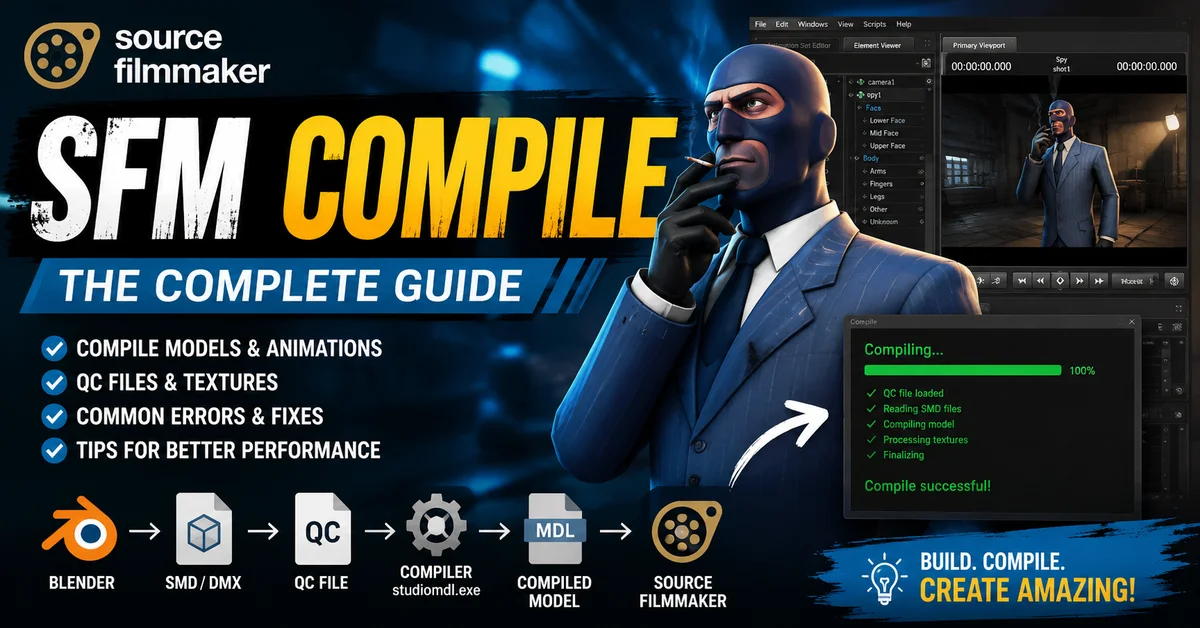
SFM compile is the process of turning raw Source engine asset files into game-ready content for Source Filmmaker. In practical terms, that means your model source files, textures, and animation data are converted into the binary model format the engine can load and use. Valve’s documentation explains that a model compile starts with source files such as SMD and DMX, then uses a QC script to drive the conversion into a Source engine model.
This step matters because Source Filmmaker is built around the Source engine toolchain, not around raw modeling files. SFM is a flexible recording and animation tool in Valve’s Source ecosystem, so custom assets must be prepared in the same pipeline the engine expects. When you understand SFM compile, you gain more control, fewer errors, and a smoother path from idea to polished cinematic shot.
RELATED: Albfilm24 Guide: Movies, Streaming, Safety & Alternatives
Understanding Source Filmmaker (SFM) Basics
Source Filmmaker is Valve’s engine-based tool for creating and editing 3D recorded footage. It sits inside the Source family of tools, which means it works best with assets built for that environment. That is why creators often treat SFM as both an animation workspace and a final presentation tool for cinematic animation SFM projects, machinima production, and YouTube SFM videos.
SFM fits into the broader Source Engine pipeline by relying on the same asset rules used by Source games and modding tools. The Source SDK is available through Steam to users who want to create content, and Source is the underlying engine family behind many Valve and community projects. That shared foundation is what makes model compilation, material setup, and animation export workflow feel familiar across Source projects.
Creators use SFM for character scenes, prop-heavy shots, expressive posing, and polished renders. The same workflow also helps artists prepare content for other Source-based projects, including Garry’s Mod, which has long been part of the Source ecosystem and is distributed on Steam. Once you understand the compile path, you can reuse the same habits for different Source-engine pipelines.
What Does “SFM Compile” Mean?
In Source terms, compiling means taking source assets and transforming them into the engine’s runtime format. For models, that usually means moving from source files like SMD or DMX, plus a QC file, into a compiled .MDL model. Valve’s model documentation also notes that a QC file controls how the source files are transformed into a Source engine model.
Compiling is not the same as rendering. Compiling prepares the asset so the engine can load it; rendering is the step where SFM exports the scene as a movie or image output. Valve’s SFM export docs describe rendering as exporting a session into a movie or still image, while compile docs describe converting source files into engine-ready model assets. That difference is the heart of the SFM render vs compile question.
In 3D asset processing, compile is the bridge between art and engine. Without it, the Source Engine cannot reliably interpret your custom model structure, materials, and animation data. With it, you gain a clean pipeline for testing, debugging, and reusing assets across projects with far less friction.
How the SFM Compile Process Works
The Source Filmmaker compile process usually starts with a model in a DCC tool such as Blender, then moves through export formats such as SMD or DMX, and finishes with a compiled Source model. Valve’s docs describe SMD as a StudioModel Data format and DMX as a more modern Source model format, while Blender Source Tools supports export and import for both.
The QC file is the script that tells the compiler what to do. It defines the model name, which mesh files to use, which textures to reference, and which sequences or collision data to include. In other words, the QC file is the blueprint that turns raw parts into a working model, which is why SFM QC file compile problems usually point back to a script issue rather than a model-view issue.
Once compiled, the Source Engine reads the resulting model and links it to materials and textures through the game’s folder structure. Source materials are defined in VMT files, and those materials point to VTF texture files. This makes the compile process not just a geometry step, but a full asset integration step.
Essential Tools for SFM Compile
Crowbar is one of the most widely used community tools for Source model work. Valve’s documentation now describes Crowbar as a modding toolset, and community resources regularly recommend it for compiling and decompiling Source models. For many creators, an SFM Crowbar compile tutorial is the easiest path into the workflow because the interface simplifies a process that otherwise depends on command-line tools.
Blender is a strong starting point for custom model work because it pairs well with Source Source Tools. Valve’s Blender Source Tools documentation says it can import and export SMD and DMX files, which makes it a practical bridge between modeling and the Source pipeline. That is why Blender SFM export is such a common search term among creators who want a smoother asset conversion workflow.
studiomdl.exe is the classic Valve compiler used to turn intermediate model files into the final .MDL format. Valve’s StudioMDL documentation describes it as the command-line tool used to compile models from exported formats into binary models read by the engine. In many workflows, Crowbar simply acts as the easier front end for this underlying compiler.
Steam matters because the Source SDK is available to Steam users, and SFM lives inside the Valve/Source ecosystem. A clean environment matters too: correct game paths, proper SDK setup, and the right compiler target can prevent a long list of avoidable SFM compile not working fix issues before they start.
Step-by-Step Guide to SFM Model Compilation
Preparing 3D models
Start with a clean model: proper scale, clean topology, and sensible materials. Before export, make sure the model is rigged and weighted correctly, because Source compilation expects the structure to be stable. The more organized your model file is, the easier it is to reduce debugging compile errors later.
Exporting SMD/DMX files
After the model is ready, export the geometry and animation data into SMD or DMX. Valve’s model creation docs note that SMD is a source format for 3D model data, while DMX is supported in the modern Source toolchain and by Blender Source Tools. A clear naming convention helps keep reference meshes, physics meshes, and animation files easy to manage.
Writing QC files
Next comes the QC file. This script tells the compiler the model name, body parts, texture folders, animation sequences, and collision model settings. Valve’s documentation is explicit that the QC controls the compilation process, which is why a small typo can stop the whole build or produce a confusing QC compile error fix scenario.
Running the compile process
With the files ready, run the compile through Crowbar or studiomdl.exe. Crowbar is often preferred because it centralizes compile settings and helps users keep the output tidy, while direct studioMDL use is valuable for deeper troubleshooting. The key is to verify the output paths, watch the log, and confirm that the final .MDL lands where SFM expects it.
Importing models into SFM
After a successful build, place the compiled model and materials in the proper Source folders and refresh SFM. If the model path and material path are correct, SFM can load the asset, apply the texture set, and let you animate immediately. That final import step is where the whole compile workflow becomes visible and rewarding.
How to Compile Animations in SFM
Animation in the Source pipeline usually begins in the animation tool or rigging package, then moves into the compile path through exported data. Valve’s model creation docs describe skeletal animation as one of the source components of a model compile, which is why clean export naming and sequence setup matter so much. In practice, that is the backbone of how to export SFM animation cleanly for engine use.
Good keyframes and solid rigging make compile results more predictable. If bones, weights, and sequence definitions are stable, the compiled animation will behave better inside SFM and other Source-based tools. This is especially important for facial work, bodygroup changes, and any cinematic animation SFM scene that depends on smooth motion.
Creators usually compile animations by pairing a reference mesh with animation SMD or DMX files and then defining the sequences in the QC script. That method is common because it aligns with the Source Engine’s expectation that model behavior, motion, and materials are all declared in the compile stage. For long-term reliability, a repeatable animation export workflow is often better than improvising each time.
SFM Compile vs Render: Key Differences
Compiling builds the asset. It transforms the source model files into an engine-readable model that can be loaded, animated, and shared in the Source environment. If the compile fails, the asset does not exist in a usable form yet, so no amount of rendering can fix that upstream problem.
Rendering, by contrast, is the final visual output step in SFM. Valve’s export docs state that SFM can export a session as a movie or still image, which is the point at which your scene becomes a playable deliverable. Rendering settings affect the look of the final shot, but they do not replace the compile process for custom models.
Use compile when you are preparing assets; use render when you are finishing a scene. That simple split helps creators avoid confusion and save time. If a prop is missing, fix the compile. If the scene looks soft or needs a higher resolution export, adjust the render settings instead.
Common SFM Compile Errors and Fixes
Missing textures issues
A missing textures error in SFM usually means the material path, VMT file, or VTF file is wrong or incomplete. Since Source materials are defined in VMT files and point to VTF textures, a mismatch in naming or folder structure can break the link even when the model itself compiles successfully. The fix is usually to verify folder paths, material names, and the texture reference inside the VMT.
Model not loading problems
If a model does not load, the problem may be in the compile output path, the QC file, or the asset folders SFM reads from. Valve’s model docs show that the QC controls how source files become the final model, so a wrong modelname, missing reference mesh, or bad path can prevent loading even when the compile tool finishes. That is a classic model not loading SFM troubleshooting path.
QC file syntax errors
A QC file syntax mistake can stop the compile immediately. Because the QC file is a command script, small formatting issues can be costly: a wrong quote, a wrong file name, or a missing command can trigger the compile failed SFM fix hunt. The safest habit is to keep QC files clean, readable, and commented only when necessary.
Bone weight and rigging errors
Bone weight problems usually come from mesh weighting that does not match the skeleton cleanly. In Source pipelines, the compile stage assumes the rig is coherent, so messy weights can produce broken motion, deformed meshes, or failed builds. That is why proper rigging and weighting are not optional extras; they are core compile prerequisites.
Crash during compilation
A crash during compilation often points to an asset that is too complex, a malformed script, or an incompatible setting in the toolchain. Community guidance around Crowbar and StudioMDL shows that compile logs and correct compiler selection matter a lot, especially when porting models or using older Source branches. In many cases, simplifying the model or correcting the QC script is enough to stop the crash.
Optimizing SFM Compile for Better Performance
A lighter model compiles more smoothly and performs better in SFM. Reducing unnecessary geometry, keeping bodygroups lean, and avoiding bloated meshes can make the compile process faster and the scene more stable. This is especially helpful for large cinematic scenes where multiple assets must coexist without slowing down the pipeline.
Texture optimization matters because Source materials rely on VMT and VTF files, and large or messy texture sets can make troubleshooting harder. Keeping texture names consistent, using the right material folders, and avoiding unnecessary variations all improve the odds of a clean compile and a clean render. Good texture mapping is one of the fastest ways to strengthen the whole asset pipeline.
The best compile habits are simple: keep source files organized, test one change at a time, read the compiler log, and do not overload the model with features you do not need. The Source toolchain rewards discipline. A tidy compile workflow saves hours later, especially when you are building multiple models or iterating on the same scene.
Advanced SFM Compile Techniques
Advanced users often build custom pipelines that combine Blender, export tools, QC templates, and Crowbar profiles. Blender Source Tools makes that pipeline more flexible because it handles SMD and DMX export cleanly, and Crowbar can then pass those assets into the compiler. This setup is ideal for creators who want repeatable, professional-grade Source content.
Some projects compile multiple related models, such as props with shared materials or animated parts built as separate assets. The Source pipeline supports this style well as long as each file is named and referenced clearly in the QC logic. Multi-model organization is one of the smartest ways to keep larger SFM workshop compile issues from becoming chaotic.
Advanced QC scripting can define scale, sequences, collision behavior, attachments, and other model behaviors in one place. Valve’s QC and model-creation docs show that the script controls how the asset is assembled, so learning more QC commands gives you more power and less guesswork. Once you are comfortable with QC structure, SFM custom model compile work becomes much faster and more reliable.
Tips for Beginners in SFM Compilation
Beginners often make the same few mistakes: wrong file names, broken material paths, missing reference meshes, and inconsistent export settings. A great first habit is to keep the model, texture, and QC folders separate and labeled clearly. That alone prevents a surprising number of errors and makes each compile log much easier to read.
One of the most useful shortcuts is to build a small test model first. That lets you confirm the compiler, folders, and materials are all working before you attempt a larger asset. Community tools like Crowbar and StudioMDL wrappers exist partly because they reduce friction and let artists stay focused on the creative side of the process.
The best learning resources are the official Valve Developer Community pages for Source Filmmaker, model compilation, QC files, Blender Source Tools, and material setup. Those pages reflect the established Source workflow and are the strongest starting point when you want accurate guidance instead of guesses. For beginners, that is the fastest way to build trust in the process and confidence in the result.
Frequently Asked Questions (FAQs)
What is SFM compile used for?
SFM compile is used to convert raw Source asset files into usable game-ready models, materials, and animation data. In a Source Filmmaker context, it is the step that makes custom content load correctly in the engine so you can animate, stage, and render it.
Why does SFM compile fail?
SFM compile usually fails because of a QC file problem, a bad file path, a missing source asset, or a rigging issue. The compiler log is the best place to start, because it often points directly to the broken command or missing file. Most failures are fixable once the asset path and script logic are checked carefully.
Can Blender directly export to SFM?
Blender does not export to a finished SFM model format by itself, but Blender Source Tools can export and import SMD and DMX files for the Source pipeline. Those files still need to be compiled afterward with the Source toolchain, usually through Crowbar or studiomdl.exe. That is why Blender is a major part of the process, but not the final step.
Is Crowbar necessary for compiling?
Crowbar is not the only way to compile, but it is one of the most convenient and widely used tools for Source modding. Direct use of studiomdl.exe is still valid, and some advanced users prefer it for manual control. For most creators, Crowbar offers the best balance of speed, visibility, and ease of use.
Summary
SFM compile is the engine-room of a strong Source Filmmaker workflow. It connects Blender, SMD and DMX exports, QC scripts, studiomdl.exe, Crowbar, materials, and textures into one dependable pipeline. Once that path is clear, the creative side becomes much more exciting because your models load properly, your animations behave, and your scenes move from idea to final render with far less friction.
If you focus on clean files, accurate QC scripting, organized materials, and patient testing, the compile process becomes a strength instead of a roadblock. That is the real value of understanding SFM compile: it gives you control, saves time, and opens the door to better cinematic animation SFM work, stronger game content creation, and more polished Source engine projects.